
Some questions are hard to put into words. What does this error message mean? What is this chart telling me? When am I next meeting the person who has just emailed me? Since the summer, you’ve been able to show Copilot what you mean instead: share your screen during a voice chat, ask out loud, and Copilot answers out loud too.
Microsoft calls the feature vision. We tried it out, and this article shows how to start it, what Copilot can see, and how to get it to bring in your emails, calendar, and files as well.
 Benefit: Ask about what’s on screen
|
 UseCase: Explaining and looking things up
|
 Reading time:
3 min |
 Difficulty: Beginner
|
Overview
Step by step
- Open the Microsoft 365 Copilot app on Windows or in your browser and go to Chat.
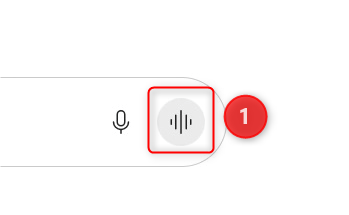
- Start a voice chat—with the voice chat button in the prompt box, the Copilot key on your keyboard, or the shortcut Windows key + C.
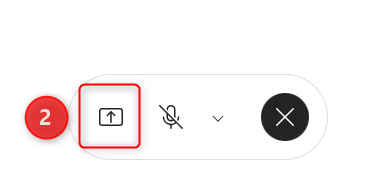
- Once the voice chat is running, a small bar with a microphone appears. Select the arrow icon on the left (Start Screen Share), then choose whether to share your whole screen or just one window. A notice shows that sharing is on.
- Switch to the window you want to talk about, and give Copilot a moment before you ask.
- Ask your question out loud. If you want Copilot to draw on your emails, calendar, or files, say so explicitly—for example, “Find this file in my work data and tell me what’s in it.”
- Select Stop sharing to end screen sharing. The voice chat carries on until you close it with the X.
Microsoft says it works much the same way on a phone: start a voice chat in the Copilot app and tap the camera icon. Copilot then sees whatever your camera sees—a business card, a printout, or a whiteboard, for example.