

GPT-5.5: More Depth on Demand

With GPT-5.5 Thinking and GPT-5.5 Pro, OpenAI is expanding the model lineup in ChatGPT — fast answers continue to come via GPT-5.3 Instant. Instead of a single default mode, you now choose the right depth for the task at hand, or let ChatGPT switch automatically. In a typical workday that moves between quick emails and complex analysis, that distinction is genuinely useful. The clearer separation of modes puts more control into knowledge work — and that’s exactly where it counts. Here’s what you need to know and how to get started.

 

Info Value: Adjustable response depth
UseCase Use Case: Analysis, writing, research
Zeit Read time:
4 minutes
Schwierigkeit Difficulty: Beginner

OpenAI is introducing GPT-5.5 as a new model that joins the existing Instant, Thinking, and Pro options in ChatGPT. The most significant change is structural: fast answers on one side, deeper analysis on the other.

The model is available in ChatGPT for Plus, Pro, Business, and Enterprise users; GPT-5.5 Pro is available for Pro, Business, and Enterprise. Worth noting: this is built directly into ChatGPT — no separate tool to set up.

On privacy: OpenAI continues to rely on ChatGPT’s existing data-handling mechanisms. Specific details around data processing vary by plan — Enterprise users in particular should review their agreement for the full picture.

  1. Open ChatGPT in your browser and sign in. Check whether GPT-5.5 is available on your current plan.
  2. Start a new chat and click the Model Picker at the top to open the model selector.
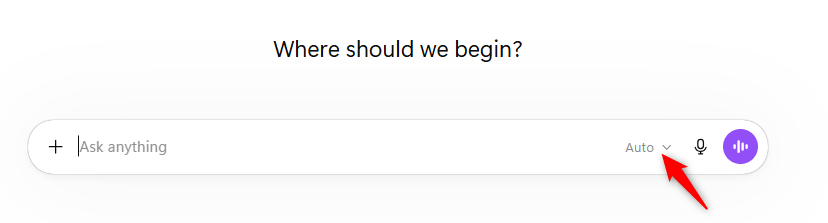
  1. Choose Thinking for more complex analysis, or Pro for particularly demanding or high-precision work.
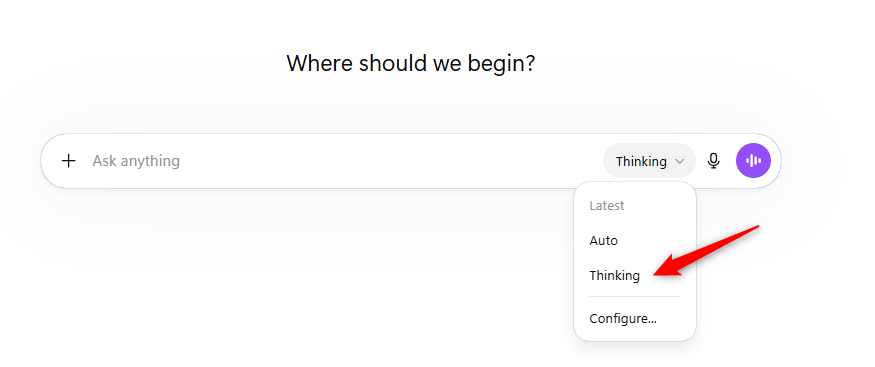
  1. Optionally, click Configure to set your preferences for automatic switching between Instant and Thinking, or to access legacy models.
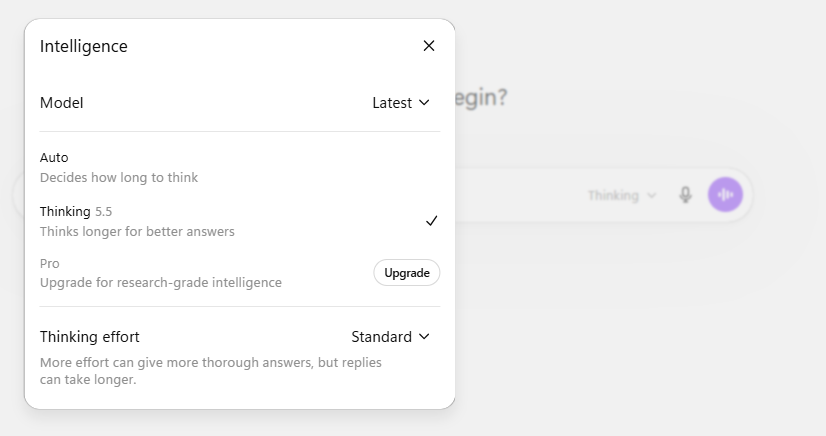
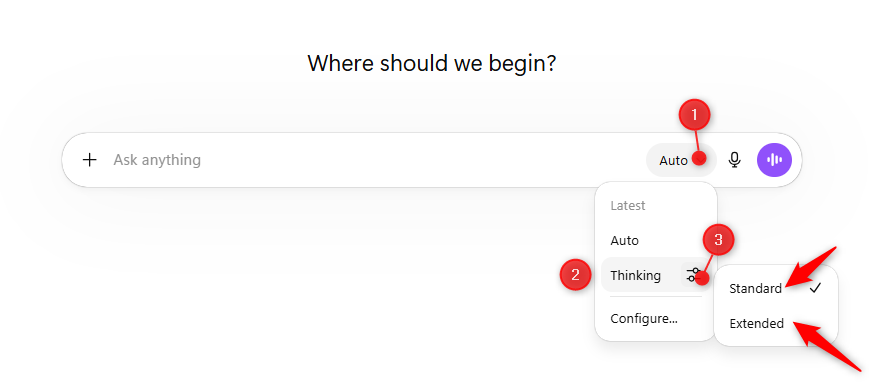
  1. In the message input, use the thinking-time toggle to set your preferred depth level — options include Standard, Light, Extended, and Heavy.
Reports from the broader user community suggest that complex tasks produce more consistently structured results in Thinking mode — though the trade-off is that responses take noticeably longer.

Several users note that GPT-5.5 takes a more methodical approach to longer content and multi-part requests, with general feedback pointing to more consistent outputs compared to before.

The speed-depth trade-off appears to be a deliberate design choice rather than a limitation — users who commit to Thinking mode are exchanging response time for analytical depth, and most describe that as a fair deal for the right tasks.

For straightforward tasks, the fast mode holds up well. The gap between modes becomes most apparent when the prompts are genuinely demanding.

  • Choose your mode deliberately: Instant is perfectly sufficient for short answers — Thinking only earns its keep on genuinely complex tasks.
  • Factor in response time: Deeper analysis takes longer. That’s not always practical depending on the situation.
  • Check your plan’s data handling: For sensitive content, review the privacy and data processing terms for your specific ChatGPT plan — Enterprise users should consult their agreement for the details.

Room for improvement:

  • No guaranteed automatic context detection: While Instant can switch to Thinking automatically in some cases, the model won’t always recognise on its own when more depth is needed — it’s worth setting this manually when it matters.
  • Start with Instant: Generate a quick first draft, then deepen selectively — a clean workflow that holds up across most tasks.
  • Request two versions: Ask for a short answer first, then a detailed one. The contrast is immediately useful and saves a lot of back-and-forth.
  • Use thinking-time intentionally: For presentations, strategy docs, or detailed concepts, dialling up the depth tends to produce noticeably better structure.
  • Be specific about what you need: A clear goal upfront makes a bigger difference to output quality than almost anything else.
  • Work in stages: Ask for an outline first, then the full write-up — especially useful for longer pieces.

GPT-5.5 is a meaningful step forward for ChatGPT: you can now choose between fast and thorough — or combine both — instead of getting whatever the model defaults to. For typical knowledge work — drafting concepts, structuring content, working through complex questions — Thinking mode pays real dividends. Quick access for straightforward tasks remains fully intact.

The real strength here isn’t any single mode in isolation. It’s the interplay between them.

If you want to see the difference for yourself, run the same task twice: once in Instant, once in Thinking. That’s the fastest way to get a feel for when the extra depth is actually worth it — start with something real from your current workload.