

No more talking over you: ChatGPT now listens while it talks

On 8 July, OpenAI introduced GPT-Live, a new generation of voice models that now powers voice mode in ChatGPT. The key difference is architectural: GPT-Live is full-duplex, meaning it keeps listening while it is speaking. Interruptions, thinking pauses and small acknowledgements such as “mhmm” become part of the conversation instead of derailing it. The rollout is global across the iOS and Android apps as well as ChatGPT.com, with paying users getting GPT-Live-1 and free accounts the smaller mini variant. In our own testing, the new mode had also already landed in the classic Windows app, even though OpenAI’s documentation still excludes the desktop apps. Here is what the new voice mode can do, and what to watch out for when you try it.

 

Info Value: Work by voice, naturally
UseCase Use case: Talking to ChatGPT hands-free
Time Reading time:
4 min
Difficulty Difficulty: Easy

GPT-Live fixes a problem every voice assistant has had so far: the model had to wait until you had finished speaking — and a moment’s hesitation or a bit of background noise was enough to count as the end of your turn. The new full-duplex architecture processes your voice and its own output simultaneously, letting GPT-Live decide many times per second whether to speak, keep listening, pause, or reach for a tool. When a question calls for more than quick conversation, the voice model passes it to GPT-5.5 in the background — for web searches or longer reasoning, say — and keeps talking to you while the answer is prepared. Also new: visual answer cards for topics such as weather, stocks and sport, a live translation capability, and three selectable intelligence levels (Instant, Medium and High).


Important caveat for business users: At launch, GPT-Live only reaches the consumer plans: free accounts get GPT-Live-1 mini, while Go, Plus and Pro get the full model. ChatGPT Business, Enterprise and Edu are excluded, as are custom GPTs and temporary chats. OpenAI has not given a date for the business plans. That said, new consumer features have consistently made their way into the Business and Enterprise plans after a delay, and we expect GPT-Live to follow the same path.


The picture is less clear on the desktop. OpenAI’s help pages state that Live is not available there for now, yet in our testing the new mode — complete with its “Live” label — was already running in the classic Windows app (renamed “ChatGPT Classic” on 9 July), while the new ChatGPT desktop app that grew out of the Codex app did not offer it. OpenAI’s restriction most likely refers to that newer app. An API version has been announced, but not yet dated.

  1. Open the ChatGPT app on iOS or Android, or go to ChatGPT.com in your browser. In our testing, the new mode also worked in the classic Windows app (ChatGPT Classic).
  2. Tap the voice icon in the message bar and allow microphone access if you are prompted.

  3. Check for the “Live” label at the top of the voice chat — if it is there, the new model has already reached your account.

  4. Simply start talking. You can interrupt GPT-Live at any point to ask a follow-up question, or pause to gather your thoughts without it jumping in.
  5. Use the slider icon in the top right to choose your voice and intelligence level: Instant for fast answers, Medium or High when you want ChatGPT to think for longer.
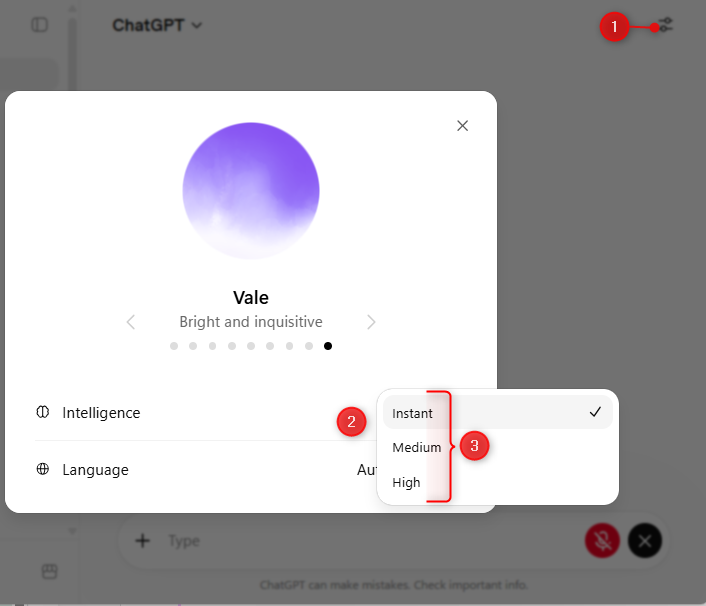
  6. In the iOS and Android experience, under Settings Voice, you can switch between Live, Advanced, and Standard modes — useful if you need capabilities such as video, which Live does not yet support.

Early reactions have been largely positive. After several hours with GPT-Live, TechRadar reported that the experience feels more than ever like talking to a real person, right down to the hesitations and the variety in speech patterns, with only occasional glitches along the way. In a Reddit Q&A, OpenAI acknowledged some launch issues of its own: memory is currently unreliable in the new voice mode, and the team is investigating. Several users have also reported that foreign words and phrases are sometimes pronounced with an English accent — something OpenAI itself flags, noting that for certain languages the model may have a non-native accent or gaps in fluency. According to the help pages, GPT-Live is also not yet optimised for conversations involving several speakers in the room.

  • A staggered rollout: The switchover began on 8 July, but it may take several days to reach every account. If the “Live” label has not appeared for you yet, check Settings → Voice → Model.
  • Business and Enterprise are still waiting: If you use ChatGPT on a Business, Enterprise or Edu plan, GPT-Live is not part of the launch, and OpenAI has not yet named a date for those plans. Custom GPTs and temporary chats are excluded for now as well. The classic Windows app, on the other hand, already showed us the new mode – contrary to what OpenAI’s documentation currently says.
  • No video or screen sharing: GPT-Live does not support video or screen sharing at launch. Advanced Voice Mode remains available for those features, and you can switch back to it in the voice settings.
  • Answers still need checking: The new voice experience can get things wrong too. OpenAI recommends verifying anything date-, time- or location-sensitive.
  • Ask it to just listen: At the start of a conversation, tell GPT-Live to hold off until you address it directly – something like “wait until I ask you to respond”. That lets you think out loud without being interrupted.
  • Try live translation: Ask GPT-Live to translate what you are saying into another language as you speak, then simply carry on talking. Simultaneous translation is one of the most striking things the new model can do.
  • Find a quiet spot: Background noise or several voices in the room can still throw GPT-Live off. Headphones or a quieter environment make a noticeable difference.

GPT-Live is the biggest step ChatGPT‘s voice mode has taken towards genuine conversation: listening and speaking at once, real room to think, and GPT-5.5’s intelligence working away in the background. If you use ChatGPT on the move, on your commute or hands-free, it is worth trying straight away — it comes with your existing plan at no extra cost. Companies on Business or Enterprise licences will have to be patient a little longer, and anyone relying on video, screen sharing or memory should keep the known teething problems in mind. The sensible next step: open voice mode, look for the “Live” label, and put the new conversational style to work on an everyday question – ideally in the language you actually work in, so you can judge the quality for yourself.