


Personalized AI with M365 Copilot Memory

Personalized AI with M365 Copilot Memory: Less prompting, more time saved

Microsoft365 Copilot is getting a Memory feature that allows the AI assistant to remember user preferences. It stores relevant information about your role, projects, preferred writing styles, and frequent requests—and automatically applies this knowledge in future conversations. This saves time, avoids repetition, and delivers results that perfectly match your personal work style.

Added value: Time savings         Scenario: Personalized AI usage     Reading time: 4 minutes           Difficulty: Beginner

Evaluation of the function

User-friendly
Creation and expansion occur via prompt or passively. 100%
Time-saving
Reduces manual effort, especially when handling complex tasks or formulas. 100%
Added value
Provides personalized support and results that closely match your individual style. 90%
Potential
Improves over time—evolving into a fully personalized, context-aware AI assistant. 100%

How does the function perform?

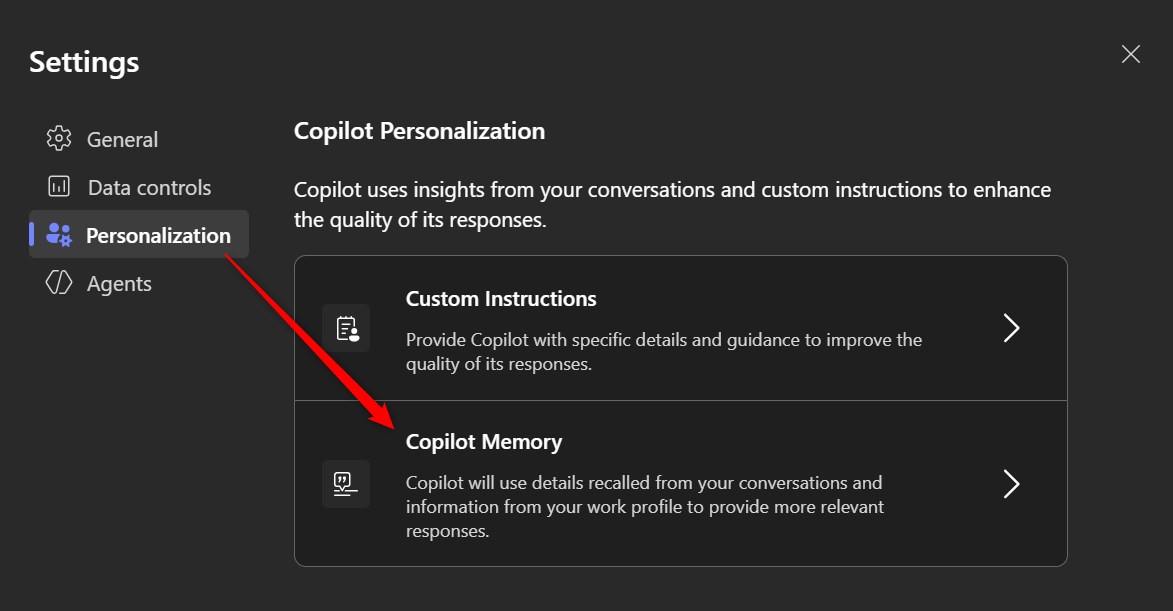
  • On the Copilot homepage, click the three-dot menu in the upper-right corner.
  • Open Settings.

  • You’ll find the Memory feature under the menu item Personalization.
We tested Copilot multiple times using identical prompts — once with Memory enabled and once without. The results were then compared.

  • Copilot reliably applies the preferences stored in Memory — even across multiple chats.
  • You no longer need to retype context or recurring instructions, which speeds up interactions.
  • Popular uses include defining writing style, preferred formats, a personal abbreviation list, or a “blacklist” of terms.
  • Memory also provides access to relevant background information, such as team member names or project details.
  • Important: The prompt still has the strongest influence on the output. For example, even creative users with detailed Memory settings may receive structured, neutral responses — depending on what their prompt requests.
  • Memory is made up of modular information blocks (e.g., personal details, role, projects, interests, preferred writing style, etc.) that can be viewed, edited, or deleted independently.
  • Over time, Memory automatically builds itself in the background based on your interactions with Copilot.
  • However, if you want to speed up the process, you can explicitly instruct Copilot to save information using prompts such as “Save the following information to Memory…,” “Forget that,” or “Remember this.”
  • Memory is not a diary: Copilot only stores facts that are permanently relevant — not temporary thoughts, moods, or to-do items.
  • Only new information is added to Memory; existing data is not duplicated.
    When new information is stored during a conversation, you’ll see a notification reading “Memory updated.”
  •  You have full control over all Memory entries and can disable the feature entirely at any time.
  • As your Memory grows, it can quickly become cluttered, and your role, tasks, or preferences may change over time. We therefore recommend reviewing and updating your Memory regularly to keep it accurate and relevant.

We think these features are truly impressive, so we asked Copilot to explain how Memory differs from Custom Instructions.
Understanding this distinction is essential to personalize the AI effectively.
Copilot provided the comparison in the form of a table:

Memory (Long-Term Memory)

  • Facts about you that remain permanently relevant (e.g., role, working style, interests)
  • Position, company, team, responsibilities
  • Tools you regularly use (e.g., Copilot, M365)
  • Topics currently or continuously relevant to your work
  • People you frequently collaborate with
  • Recurring goals or projects
  • Preferences for language, style, and structure

Custom Instructions (Behavior & Style)

  • How the AI should write, think, and communicate
  • What tone you prefer (e.g., clear, direct, no overly formal or “sugarcoated” style)
  • What kinds of tasks you want the AI to handle (e.g., text optimization, brainstorming, concept development)
  • How you want Copilot to collaborate with you (e.g., as a work bestie, co-creator, or sparring partner)
  • What matters to you most (e.g., no word repetition, clear structure, consistent formatting)

The Memory feature in Copilot adds real value for anyone who works regularly with recurring information and requirements. It enables personalized, context-aware assistance without the need to constantly repeat the same details. Particularly useful is the ability to permanently store writing style and formatting preferences.

While the prompt remains the central control element, Memory complements it effectively and noticeably increases efficiency.

Despite a few open questions about transparency and manageability, one thing is clear: the Memory feature is a promising step toward truly intelligent assistance.