


M365 Copilot expands image generation: upload an existing image and create new versions or variations within seconds. The results are based on the original image and can be precisely controlled through prompts — from subtle adjustments to creative transformations. We tested the new Copilot Chat feature using sample images, exploring common use cases to see how reliably it handles user-provided images and what practical value the generated variations offer in everyday work.
 Added value: Cost savings
 Scenario: Image Generation
  Reading time: 5 minutes
  Difficulty: Beginner
How It Works
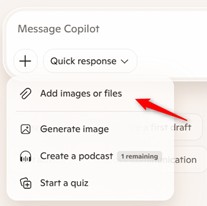
- Upload an image to Copilot Chat — either by dragging and dropping it or by clicking the plus icon in the input field and selecting “Add images or files”
- Enter your prompt for image generation.
- If needed, ask follow-up questions to make additional adjustments.
Test 1: Adjusting Scene and Environment
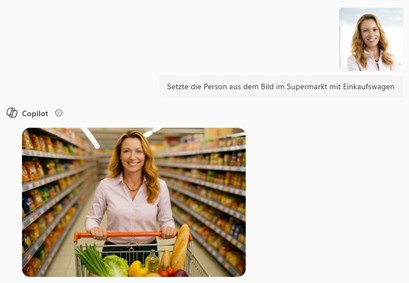
- Original Image: Portrait photo of a person
- Prompt: “Place the person from the image in a supermarket with a shopping cart.”
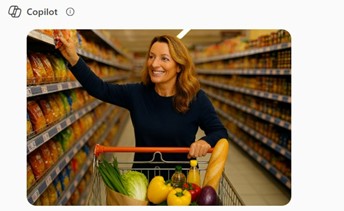
- Follow-up Prompt: “The person should be wearing their everyday outfit and reaching for an item on a shelf.”
- Result: Copilot Chat reliably isolated the person and integrated them into the desired scene. Pose, clothing, and environment adapted accurately to the prompts.
- Evaluation: Particularly suitable for communication, training, or marketing purposes, as scenes can be created quickly and easily.
Test 2: Transforming Style
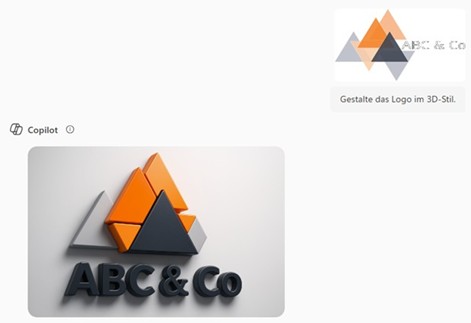
- Original Image: a logo
Prompt: “Transform the logo into a 3D style.” - Results: Copilot Chat converted the logo into a realistic 3D look. However, the original layer hierarchy of the 2D image was lost — foreground and background elements were misinterpreted. Even follow-up prompts couldn’t fully fix the issue.
- Evaluation: Great as a source of inspiration for events, campaigns, or social media. However, for professional branding, refinements by a designer remain essential.
Test 3: Creating Continuation Scenes
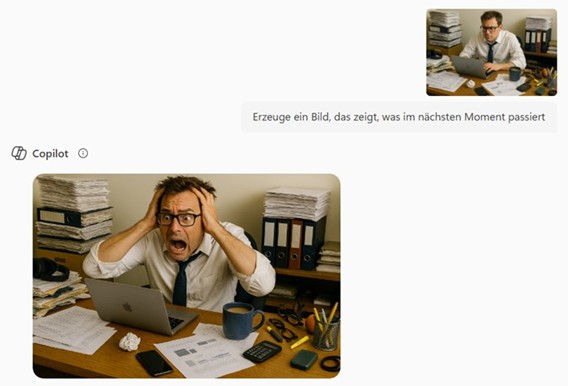
- Original Image: a picture of an everyday scene
- Prompt: “Create an image that shows what happens in the next moment.”
- Result: Copilot Chat placed the figure in a follow-up scene and independently developed a plausible continuation. Continuity with the original scene was maintained, even after several follow-up prompts. With additional details in the prompt, the scenes can be precisely refined.
- Evaluation: Ideal for visually illustrating step-by-step processes, accompanying workflows, or creatively staging campaigns. Especially exciting for educational scenarios, training sessions, or marketing stories.
Limitations of the Feature
- Analysis Errors: The interpretation of the original image is not always accurate.
- Limited Usability: The results are inspiring but not always immediately usable.
- Upload Limit: Only one image can be uploaded per request.